


BenefitHub
4.6151.00 Reviews
App Specs
- Version
- 15.13.49
- Updated On
- License
- Free
- Downloads
- 100,000+
- Developer
- BenefitHub
- Categories
- Shopping
- Platform
- Android
Screenshots
 Analysis by AppCompare
I approached BenefitHub as a shopping app with a practical question in mind: does a benefits and rewards platform make everyday purchasing easier, or does it simply add another account and another place to check? My experience is that it can be useful when your employer or organization already gives you access to its offers, but its value depends heavily on how often those benefits match the things you actually buy.
The app is free, aimed at Everyone, and developed by BenefitHub. It has built a solid audience, with over one hundred thousand installs and a 4.6 average from around one thousand ratings. Those figures suggest that many users find a reason to keep it available, although they do not tell me whether every offer will be equally relevant to you. That distinction matters with a benefits app: usefulness is less about browsing endlessly and more about finding a worthwhile saving at the right moment.
How BenefitHub fits into real shopping decisions
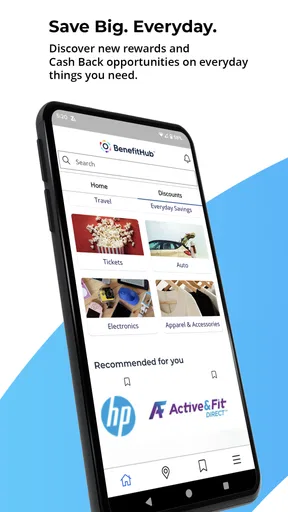
The simplest way to understand this app is as a benefits hub rather than a general marketplace. I would not install it expecting the same experience as a large retailer, a coupon browser, or a price-comparison tool. Its purpose is to bring eligible rewards and discounts into one place, so the first question is whether you have access through a participating organization and whether the available benefits suit your routine.
That makes the app particularly interesting for people who regularly shop through employer-related programs. Instead of remembering several benefit pages or searching through old messages, you can use one mobile destination as a starting point. I found that framing helpful because it prevents a common mistake: treating the app as a universal source of the lowest price. It is better viewed as an additional route to savings that you check before completing a purchase.
In an ordinary scenario, imagine that I am planning a larger household purchase or arranging a gift. I would open the app before going directly to my usual retailer, look through the relevant benefit area, and compare the available option with the price and conditions I already know. That extra step is most worthwhile when the purchase is planned. For an impulse purchase, the time spent checking may be greater than the benefit.
The app’s shopping category also creates an important expectation about convenience. A benefits platform should reduce the effort of finding eligible offers, but it cannot remove every decision. I still need to read the terms, check whether the offer applies to my intended purchase, and understand how redemption works. In my view, that is not a flaw unique to this product; it is the normal trade-off for reward programs. The key is whether the app makes those checks clear enough to be practical.
Who is likely to get the most from it
I see the strongest fit for users who have a steady reason to revisit benefit offers: people planning purchases, comparing workplace perks, or trying to make better use of an existing rewards program. It can also help someone who tends to forget available benefits because the app gives those offers a more visible place in their shopping routine.
Worth Reading Before You Choose

EA SPORTS FC Mobile 26 Is a Bigger Football Game, but It Takes Time

Flipboard Shows What News Apps Must Do Beyond the Feed

Switching to Android Auto Means Rethinking Your Driving Routine

Google Calendar Makes a Crowded Week Easier to Manage

Ludo King Makes the Most of the Minutes Between Plans

Baby Panda World Brings Quick Play to Modern Phones, but Its Game Library Feels Busy
It is less compelling for someone who wants a completely open shopping service with no eligibility step, no account setup, and no need to compare offer conditions. If your main goal is simply to find the cheapest price across the entire market, a dedicated comparison service is usually more direct. Likewise, if you rarely shop through benefit programs, an app centered on those rewards may spend more time on your phone than it saves in your budget.
That does not make BenefitHub a poor choice; it makes it a situational one. I would recommend deciding what type of shopper you are before judging it. Planned shoppers can pause and verify an offer. Frequent users can build a habit around checking benefits. Someone looking for instant, universal discounts may find the experience less satisfying.
Trust begins with what the app asks you to do
For a benefits platform, trust is not only about a polished interface or a high rating. It begins with the account journey. I pay attention to which information is requested, why an account is needed, and whether the app gives me understandable choices before I continue. Those are the moments that determine whether the service feels like a useful tool or an obligation attached to shopping.
Because BenefitHub connects rewards with a user account, I would avoid rushing through setup. I would read each screen, check the account details carefully, and use only the information needed to access the program. This is a simple but valuable habit with any benefits service: an account can make offers easier to manage, but it also makes the service more connected to your personal shopping activity.
I also prefer to keep account decisions separate from purchase decisions. If I am signing in only to see whether a benefit applies to one planned purchase, I do not want that moment to turn into an automatic commitment to use every available feature. Taking a few seconds to review the choices shown on screen gives me more control and makes the experience easier to evaluate honestly.
The current version is 15.13.49, and the app supports Android 7.0 or later. That broad compatibility is helpful if you use an older Android phone, but compatibility alone does not guarantee that every screen will feel equally comfortable on every device. I would keep the app updated through the official store and pay attention to how clearly account and benefit information is displayed on my particular phone.
Permissions, data practices, and visible choices
My approach to BenefitHub is deliberately cautious: I judge privacy through the permissions and data choices that are actually shown, not through assumptions about what a shopping app must do. Before granting access, I would inspect the Android permission prompts and the app’s privacy information. If a permission appears unrelated to viewing or managing benefits, I would pause and decide whether it is necessary for the task I want to complete.
This is especially important because benefits accounts can feel more personal than a casual browsing session. The account may be tied to eligibility, and shopping activity can reveal habits even when the user is not thinking about it that way. I would therefore avoid granting optional access automatically, and I would revisit the phone’s permission controls if I stopped using the service.
There is a practical difference between a permission that is required for a clearly explained function and one that is merely convenient. When an app explains the purpose of a request and lets me make a visible choice, I feel more comfortable proceeding. When the reason is unclear, I prefer to deny access first and see whether the core experience still works. That approach protects user agency without claiming that every permission request is harmful.
I would also review the account controls available inside the app and through Android settings. Useful controls include the ability to sign out, change account details, manage notifications, and remove access when the service is no longer needed. The exact options can vary by account and platform, so I would rely on the controls presented to me rather than assuming that every user sees the same path.
Notifications deserve particular attention. A benefits app can be helpful when it reminds me about a relevant opportunity, but frequent promotional alerts can turn a useful tool into background noise. I would keep only the notifications that serve a clear purpose and turn off the rest through the app or device settings. That small adjustment can make the difference between checking BenefitHub intentionally and feeling chased by it.
The moments when extra care pays off
The most data-sensitive moment is usually not browsing a general offer. It is moving from browsing into an account action, eligibility check, or redemption process. At that point, I would slow down and confirm that I am using the correct account, that the offer is intended for me, and that I understand what will happen after selecting it.
I would be especially careful when an offer sends me to another service or asks me to complete a purchase outside the main app. A benefits platform may act as the doorway while another provider handles the transaction. Before continuing, I would check the destination, the purchase conditions, and whether I am comfortable creating or using another account. This is one of the most important trade-offs: a benefit can be attractive while the extra steps still make it inconvenient.
Another useful habit is to take note of the offer conditions before I begin checkout. I would look for restrictions, expiration wording, eligible products, and any limitations on combining discounts. I would not assume that an offer shown in the app automatically applies to every version of a product or every purchase method. Reading first prevents the most frustrating outcome: reaching the final step and discovering that the saving does not apply.
I would also avoid treating a reward as a reason to buy something I did not need. The app can make a discount feel urgent or unusually attractive, but a reduced price is still spending. My personal rule would be to decide what I need first, then use BenefitHub to see whether a benefit improves that planned purchase. That keeps the reward in its proper role: a way to reduce a cost, not a prompt to create one.
For shared devices, I would sign out when appropriate and avoid leaving an account open where another person can access it. This is a small operational detail, but it matters when a benefits account contains personal information or connects to purchase activity. I would apply the same care on public or borrowed devices and would never save login details there casually.
How I would build a low-effort routine
I would not open BenefitHub every time I shop. Instead, I would use it at three specific points: when planning a larger purchase, when reviewing available workplace rewards, and when I am about to buy something that commonly appears in benefit programs. This keeps the app useful without turning it into another feed that demands daily attention.
Before opening it, I would define the purchase or category I am checking. That makes browsing more focused and helps me compare the benefit with the normal price. I would then verify the final conditions before committing. This two-stage workflow—decide what I want, then check the benefit—reduces the risk of being distracted by offers that do not match my needs.
A second tip is to compare the complete cost rather than the headline saving. If redemption requires a separate account, a particular purchase route, or extra time, those factors have value too. A slightly smaller discount that is simple and transparent may be better than a larger one that involves several steps. BenefitHub is most useful when it helps me make that comparison quickly instead of encouraging me to chase every percentage.
A third tip is to treat account maintenance as part of shopping maintenance. I would periodically review whether my contact details are current, whether notifications are still useful, and whether I recognize the account activity. If I no longer have a reason to use the platform, I would look for the available sign-out, account, and privacy controls rather than leaving an unused account unattended.
These habits also answer a question many new users have: do you need to use every benefit to justify installing the app? I do not think so. One or two genuinely useful purchases can make it worthwhile, while months of irrelevant browsing can make it unnecessary. The right measure is not how many offers are visible, but whether the service improves decisions I was already going to make.
Where it differs from ordinary shopping alternatives
Compared with a large retailer’s app, BenefitHub is less likely to be the place where I complete every part of a purchase. A retailer usually wins on product depth, delivery information, order history, and checkout convenience. BenefitHub’s advantage is the benefits layer: it may help me discover an eligible saving before I choose the retailer or purchase route.
Compared with a coupon app, it is more closely tied to a benefits relationship rather than being a broad search for public promotions. That can make the offers more relevant to an eligible user, but it can also make the service less useful if the available program does not match their needs. A public coupon service may offer more variety, while BenefitHub may be more convenient for benefits already connected to the user.
Compared with a price-comparison tool, the app serves a different purpose. Price comparison asks where an item is cheapest. BenefitHub asks whether a benefit or reward can improve a purchase through the program. I would use both when the purchase is important: first check the normal market price, then see whether the benefit changes the result. Using only one can produce an incomplete decision.
This is why I would not call BenefitHub a replacement for every shopping app. It works better as a layer in my buying process. Its success depends on whether that layer is quick enough, transparent enough, and relevant enough to justify the extra step. When it is, it can turn a forgotten perk into a practical saving. When it is not, the direct retailer or comparison service is the better route.
What may create friction
The first possible frustration is relevance. A benefits platform can contain many possibilities, but volume does not guarantee that I will find something useful for my current needs. If I have to browse too broadly or repeatedly encounter offers that do not apply to me, the app may feel like work rather than a shortcut.
The second is redemption complexity. The value of a reward depends on the complete path from discovery to purchase. If I need to switch services, remember conditions, or repeat information, I have to decide whether the saving compensates for that effort. This is not necessarily a defect in the app, but it is a real cost that a quick glance at an offer may hide.
The third is account dependence. A benefits platform is naturally more useful when I can sign in and remain eligible, but that also means the experience is not as immediate as browsing public deals. Anyone who dislikes creating accounts or managing another login should consider that before installing it.
For those reasons, I would skip BenefitHub if I wanted anonymous browsing, universal discounts, or a complete retail checkout experience in one place. I would also skip it if I had no practical access to the benefits program behind it. In those situations, a retailer, coupon service, or comparison app would be a more direct choice.
My cautious verdict
After looking at BenefitHub through the lens of trust and control, I see a useful but conditional shopping companion. Its free access, broad Android compatibility, and strong 4.6 average from around one thousand ratings make it easy to try, while its purpose as a benefits and rewards platform gives it a clear role. The real question is not whether it offers something for everyone; it is whether its benefit catalog and account experience fit your own shopping habits.
I would recommend it to someone who already has access to relevant benefits and is willing to compare the full conditions before redeeming an offer. I would use it for planned purchases, keep notifications selective, review permissions instead of accepting them automatically, and maintain control over the account when I stop using it. Those steps make the app more useful and reduce the chance that convenience quietly replaces careful choice.
My final opinion is positive, with a clear qualification: BenefitHub is best used as a deliberate benefits check, not as a universal shopping replacement. If one of your existing rewards programs makes the offers relevant, it can earn a place in your routine. If you want the broadest product search, the fastest checkout, or the least account friction, another shopping tool will probably serve you better.
BenefitHub was released on January 6, 2020, and the current version is 15.13.49. That history and its established user base make it feel like a mature option to investigate, but I would still make the decision based on the controls and offers shown during my own setup. Start carefully, grant only permissions that make sense, and judge the app by the real savings and effort it produces for you.
Pros
- Exclusive employee discounts on travel
- shopping
- dining
- and services.
- Personalized offers make it easier to find relevant workplace benefits.
- Mobile access lets you browse deals and benefits away from your computer.
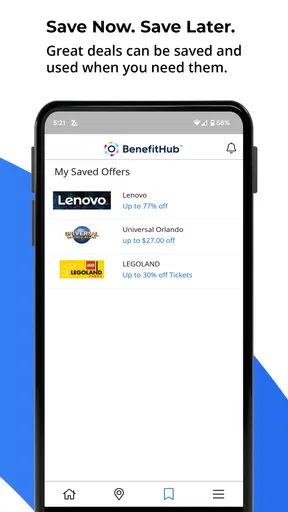
- Regularly updated offers can provide savings throughout the year.
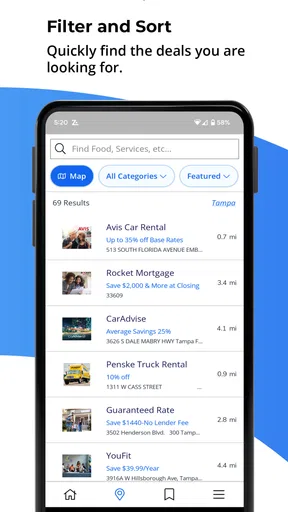
- Simple interface helps users compare available discounts quickly.
Cons
- Access usually requires eligibility through a participating employer.
- Offer availability and discounts vary by location and employer plan.
- Some deals redirect to external websites or require extra registration.
- The app may request work-related details during account verification.
- Certain benefits can have restrictions
- exclusions
- or limited redemption periods.
FAQs for BenefitHub
What is BenefitHub and what can I use it for?
BenefitHub is an employee benefits and discount marketplace that gives eligible users access to offers from participating retailers, travel providers, entertainment services, restaurants, and other businesses. After signing in through an eligible employer or organization, you can browse available deals, compare prices, and follow the instructions to redeem discounts. The exact selection of benefits depends on your employer, location, and account eligibility.
Who can access BenefitHub, and how do I create an account?
BenefitHub is generally intended for employees, members, or other users whose organization provides access to the platform. Registration may require an invitation, company email address, eligibility code, or authentication through your employer’s benefits portal. During setup, you may need to verify your identity and create login credentials. If your organization is not enrolled, you may not be able to use the full marketplace or create a standard account.
Are the discounts and offers on BenefitHub really free to use?
Access to the BenefitHub marketplace is commonly provided as part of an employee or membership benefit, but individual offers are not necessarily free. Some deals provide a percentage discount, while others use special pricing, promotional codes, gift cards, or limited-time rates. Before completing a purchase, review the offer’s terms, exclusions, expiration date, taxes, delivery charges, and any restrictions imposed by the participating merchant.
Can I use BenefitHub for travel, shopping, and entertainment purchases?
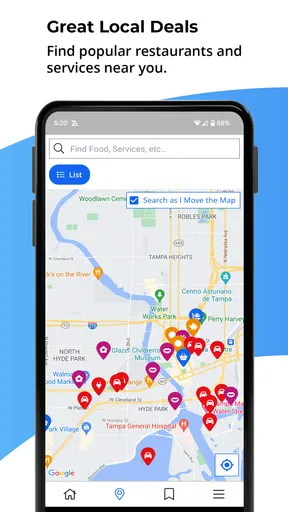
Depending on the benefits available through your organization, BenefitHub may include offers for hotels, flights, car rentals, theme parks, movie tickets, electronics, clothing, dining, and other categories. Availability can vary significantly by employer, country, and current merchant partnerships. Some purchases are completed directly on a partner’s website, so you should check cancellation policies, refund rules, blackout dates, and booking conditions before paying.
Is BenefitHub safe, and what should I do if an offer or login does not work?
BenefitHub is designed to connect eligible users with established merchants, but you should still confirm that you are using the official app or website and avoid sharing your password with anyone. If a discount code fails, an offer disappears, or login verification does not work, check the offer requirements and your account eligibility first. For unresolved issues, contact BenefitHub support or your employer’s benefits administrator.


